Support our educational content for free when you purchase through links on our site. Learn more
🚀 Master Quadcopter FPV Systems: The Ultimate 2026 Guide


Remember the first time you strapped on a pair of goggles and felt like you were actually inside the machine? That split-second transition from staring at a tiny dot on the horizon to diving through a window frame is the magic of quadcopter FPV systems. But here’s the catch: while the thrill is universal, the technology behind it is a minefield of incompatible digital ecosystems, latency wars, and confusing specs. We’ve seen pilots burn thousands on a “perfect” digital rig only to realize it was useless for the high-speed racing they actually wanted to do.
In this comprehensive guide, we’re stripping away the marketing fluff to give you the unvarnished truth about Analog vs. Digital, HDZero vs. DJI, and exactly how to build a system that matches your specific flying style. Whether you’re a budget-conscious beginner looking for your first 5-inch frestyle beast or a cinematic pilot chasing 4K sunsets, we’ve got the roadmap. We’ll even reveal the one common antenna mistake that causes 90% of signal dropouts (you won’t want to miss the troubleshooting section).
Key Takeaways
- System Compatibility is Critical: Unlike traditional RC gear, Digital FPV systems (DJI, HDZero, Walksnail) are often walled gardens; your camera, VTX, and goggles must match perfectly, whereas Analog remains the universal standard.
- Latency vs. Quality Trade-off: Analog systems offer the lowest latency for racing, while Digital systems provide HD clarity for cinematic work, but often at the cost of slight input delay.
- Build for Your Goal: A 5-inch frestyle drone requires a different motor and frame setup than a 7-inch long-range rig; choosing the wrong components is the fastest way to a crash.
- Safety First: FPV goggles block your real-world vision; always use a visual spoter and adhere to local FA/EASA regulations to fly responsibly.
Ready to build your dream rig?
- 👉 Shop Budget Analog Kits: Amazon | GetFPV
- 👉 Shop Digital Systems (DJI/HDZero): DJI Official | HDZero
- 👉 Shop FPV Goggles: Amazon | Skyzone
Table of Contents
- ⚡️ Quick Tips and Facts
- 🕰️ The Evolution of Quadcopter FPV Systems: From RC Hobby to Cinematic Revolution
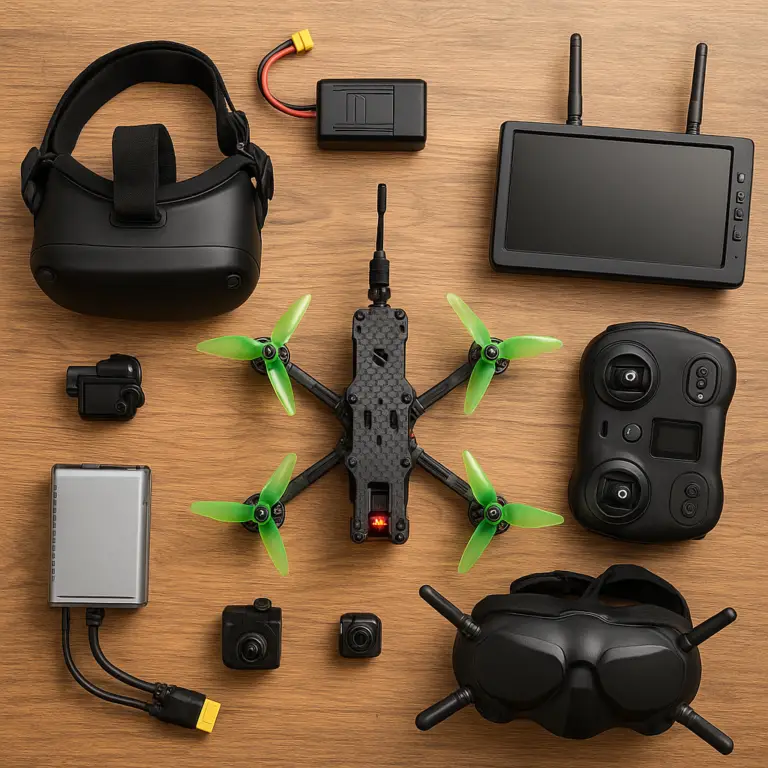
- 📚 Understanding the Core Components of a Complete FPV Setup
- 📡 Analog vs. Digital FPV Video Transmission: The Great Debate
- 🎮 Selecting the Perfect FPV Radio Controller and Goggles
- 🚁 Choosing the Right Frame, Motors, and Propellers for Your Flight Style
- 🔋 Power Systems Explained: Batteries, ESCs, and Voltage Management
- 🛠️ Essential Tools and Software for Building and Tuning Your Drone
- 📶 Optimizing Antenna Placement and Signal Range for Maximum Performance
- 🎬 Cinematic FPV: Camera Settings, Lenses, and Stabilization Techniques
- 🏁 Racing vs. Frestyle: Tailoring Your Quadcopter FPV System to Your Goals
- 🛡️ Safety Protocols, Legal Regulations, and Responsible Flying Practices
- 🔧 Troubleshooting Common FPV Issues: Video Loss, Lag, and Motor Failures
- 💡 Quick Tips and Facts
- 🏁 Conclusion
- 🔗 Recommended Links
- ❓ FAQ
- 📚 Reference Links
⚡️ Quick Tips and Facts
Before you dive headfirst into the chaotic, exhilarating world of quadcopter FPV systems, let’s hit the pause button and drop some knowledge bombs. We’ve seen too many new pilots burn through their savings on incompatible gear or crash their first build because they didn’t understand the basics.
Here is the Drone Brands™ rapid-fire reality check:
- Latency is King: In FPV, latency (the delay between the camera seeing something and you seeing it in your goggles) is the difference between a smooth landing and a tree-impacting disaster. Analog systems often win here, but modern digital systems are catching up fast.
- The “Open Ecosystem” Myth: Not all digital systems play nice together. DJI and HDZero are walled gardens; you can’t mix a DJI camera with HDZero goggles. Analog is the only truly universal language.
- Battery Voltage Matters: Don’t just grab any LiPo. A 4S battery (14.8V) behaves completely differently than a 6S (2.2V). Using the wrong voltage can fry your ESCs or leave you grounded.
- Antenna Orientation: Your VTX (Video Transmitter) antenna is useless if it’s pointing at the ground while you’re flying. Circular Polarized (CP) antennas are a must for reducing signal dropouts.
- Safety First: FPV goggles block your vision of the real world. Always have a spoter when flying, or stick to a designated flying field.
If you’re wondering where to start your journey, check out our deep dive on FPV Drones to understand the ecosystem before you buy.
🕰️ The Evolution of Quadcopter FPV Systems: From RC Hobby to Cinematic Revolution
Remember the days when “flying a drone” meant staring at a tiny dot on the horizon, hoping it didn’t crash into a bird? That was the era of Line of Sight (LOS) flying. Then came the First Person View (FPV) revolution, turning pilots into birds.
The Analog Dawn
It started in the 1980s with RC car enthusiasts strapping tiny cameras to their vehicles. By the 20s, this migrated to quadcopters. The technology was analog, meaning it transmitted video like an old-school TV signal.
- Pros: Cheapest entry point, incredibly low latency (crucial for racing), and a massive ecosystem of parts.
- Cons: The video looked like a snowy, static-filled nightmare when the signal got weak. It was “five out of ten” quality, as many veterans will tell you.
The Digital Leap
Fast forward to the 2010s and 2020s. Digital FPV systems arrived, promising HD clarity.
- DJI changed the game with the DJI Digital FPV System, offering 720p/1080p clarity that made FPV look like a movie.
- HDZero and Walksnail Avatar followed, offering alternatives that balanced latency and quality.
Why does this matter to you?
Understanding this history explains why you might see a $50 analog setup next to a $1,0 digital rig. It’s not just about money; it’s about what you want to do. Racing? Analog or HDZero. Cinematic shots? DJI.
📚 Understanding the Core Components of a Complete FPV Setup
Building a quadcopter FPV system is like building a custom PC, but if you mess up a wire, you might lose an eye (or a drone). Let’s break down the anatomy of a beast.
1. The Frame
The skeleton. It holds everything together.
- Material: Carbon fiber is the standard for its strength-to-weight ratio.
- Size: Ranging from tiny 1-inch “whops” for indoor flying to massive 7-inch long-range rigs.
2. Flight Controller (FC) & ESC
- Flight Controller: The brain. It processes sensor data (gyro, accelerometer) to keep the drone stable.
- ESC (Electronic Speed Controller): The muscle. It tells the motors how fast to spin. Modern ESCs often come in a “4-in-1” stack with the FC.
3. Motors and Propellers
- Motors: Measured by KV (RPM per volt). High KV for small props, low KV for big props.
- Props: The blades that generate lift. Prop balance is critical; an unbalanced prop causes vibration that ruins video quality.
4. The FPV Camera
- Analog: Tiny, lightweight, low latency.
- Digital: Larger, heavier, high resolution.
- Cinematic: Often uses a GoPro or DJI O3 Air Unit for 4K recording while flying.
5. Video Transmitter (VTX)
This sends the video signal from the drone to your goggles. Power output (mW) determines your range.
- Tip: Higher mW = more range but more heat and shorter battery life.
6. Antennas
- RHCP (Right Hand Circular Polarized): The standard for most systems.
- LHCP (Left Hand Circular Polarized): Used for diversity reception to reduce signal loss.
7. Goggles and Receiver (VRX)
Your window to the sky. They must match the system (Analog, DJI, HDZero, etc.).
📡 Analog vs. Digital FPV Video Transmission: The Great Debate
This is the question that splits the community: Analog or Digital? We’ve flown both, crashed both, and loved both. Here is the breakdown based on real-world performance.
The Analog Champion
Analog has been the backbone of FPV for decades.
- Latency: Unbeatable. Usually under 20ms.
- Cost: You can build a full analog system for a fraction of the price of digital.
- Durability: If you crash, the camera usually survives.
- The Downside: “Snow” and static when the signal drops. It’s hard to see obstacles in low light.
The Digital Contenders
Digital systems offer crisp, clear video, but they come with trade-offs.
| Feature | Analog | HDZero | Walksnail Avatar | DJI O3 Air Unit |
|---|---|---|---|---|
| Image Quality | ❌ Low (Static/Snow) | ✅ Good (“Spicy Analog”) | ✅ Very Good (HD) | ✅ Excellent (4K/1080p) |
| Latency | ✅ Ultra Low | ✅ Ultra Low | ⚠️ Moderate | ⚠️ Low (but higher than Analog) |
| Range | ✅ Excellent (with high mW) | ⚠️ Moderate | ✅ Excellent | ✅ Good |
| Cost | ✅ $ | ⚠️ $$$ | ✅ $$ | ❌ $$$ |
| Ecosystem | ✅ Open (Mix & Match) | ❌ Proprietary | ❌ Proprietary | ❌ Proprietary |
| Best For | Racing, Frestyle | Racing, Frestyle | Long Range, Cinematic | Cinematic, Hybrid |
The Verdict?
If you are a racer, HDZero or Analog is your friend. If you are a cinematic pilot chasing sunsets, DJI is the gold standard. As one pilot put it, “There is no system on here that is best at everything.” It’s about having the best time.
Curious about the “Ghosting” issue?
Some budget digital systems suffer from ghosting during fast movements. We’ll dive deeper into troubleshooting this in the Troubleshooting section later.
🎮 Selecting the Perfect FPV Radio Controller and Goggles
Your hands and your eyes are your lifelines. Choosing the wrong controller or goggles can ruin the experience before you even take off.
Radio Controllers: The Command Center
You need a radio with ELRS (ExpressLRS) or Crossfire protocols for long range and low latency.
- Radiomaster Boxer: The current king of versatility. Great ergonomics, ELRS built-in.
- Jumper T18: A budget-friendly powerhouse with great range.
- FrSky X10S: A classic, but newer pilots should lean towards ELRS for better range.
Pro Tip: Look for a radio with Hall Effect Gimbals. They don’t wear out like the potentiometers in cheaper radios.
Goggles: The Window to the Sky
Your goggles determine what you see.
- Analog Goggles:
Eachine EV80D: The best budget option. Great for beginners.
Skyzone Cobra X: High-end analog with excellent range and diversity. - Digital Goggles:
DJI Goggles 2/Integra: The best image quality, but expensive.
HDZero Goggles: Lightweight, low latency, perfect for racing.
Walksnail Avatar Goggles: Great value, good range, decent latency.
👉 CHECK PRICE on:
- Radiomaster Boxer: Amazon | Radiomaster Official
- DJI Goggles 2: Amazon | DJI Official
- Eachine EV80D: Amazon | GetFPV
🚁 Choosing the Right Frame, Motors, and Propellers for Your Flight Style
Not all drones are created equal. A 5-inch frestyle drone will feel like a tank compared to a 2-inch whop.
Frame Sizes Explained
- 1-2 Inch (Whops): Indoor, safe for beginners, durable.
- 3-4 Inch: The “Goldilocks” zone. Good for frestyle and some racing.
- 5-6 Inch: The standard for frestyle and racing. Fast, agile, powerful.
- 7+ Inch: Long-range and cinematic. Slower, but flies for 30+ minutes.
Motor Selection
- KV Rating:
High KV (170+): For small props (2-3 inch) and high voltage (4S).
Low KV (40-60): For large props (5-7 inch) and high voltage (6S). - Stator Size: Larger stators (e.g., 2807) provide more torque for heavy props.
Propellers
- Pitch: Higher pitch = faster top speed, lower efficiency. Lower pitch = better acceleration.
- Material: Plastic is standard. Carbon fiber is stiff but shatters on impact.
Real Story:
We once built a 5-inch frestyle drone with 250KV motors on a 6S battery. It was a rocket, but it burned out the ESC in 30 seconds because the current draw was too high. Always match your motor KV to your battery voltage and prop size!
🔋 Power Systems Explained: Batteries, ESCs, and Voltage Management
Power is the lifeblood of your quad. Mess this up, and you’re grounded.
LiPo Batteries
- Cells (S): 4S (14.8V) is standard for 5-inch. 6S (2.2V) is becoming the new standard for efficiency and power.
- C-Rating: Indicates how fast the battery can discharge. 10C is standard.
- Capacity: Measured in mAh. 130mAh is standard for 5-inch. 150mAh+ for long range.
ESCs (Electronic Speed Controllers)
- Amp Rating: A 50A ESC is standard for 5-inch. 35A for 3-inch.
- Firmware: BLHeli_32 is the industry standard. It allows for features like Dynamic Idle and Bidirectional DShot.
Voltage Management
- BEC (Battery Eliminator Circuit): Powers your FC and VTX. Ensure your VTX can handle the voltage (some need a 5V BEC, others can take 12V).
- Low Voltage Cutoff: Never fly a LiPo below 3.0V per cell. It ruins the battery.
🛠️ Essential Tools and Software for Building and Tuning Your Drone
You can’t build a drone with just your hands. You need the right toolkit.
Hardware Tools
- Soldering Iron: A temperature-controlled iron (e.g., TS10 or Pinecil) is a must.
- Hex Drivers: 1.5mm, 2.0mm, and 2.5mm are the most common sizes.
- Wire Cuters & Strippers: For clean connections.
- Multimeter: To check for shorts before powering up.
- Heat Gun: For shrinking heat-shrink tubing.
Software
- Betaflight Configurator: The standard for tuning flight controllers.
- iNav: For long-range and autonomous flight.
- BLHeli Suite: For configuring ESCs.
Step-by-Step Tuning Tip:
- Connect to Betaflight.
- Set up your receiver (ELRS/Crossfire).
- Calibrate the accelerometer.
- Set up your motors (ensure they spin in the correct direction!).
- Tune the PID values (Proportional, Integral, Derivative) to make the drone feel “snappy” but stable.
📶 Optimizing Antenna Placement and Signal Range for Maximum Performance
You have a 10mW VTX, but you lose signal at 20 meters? It’s likely your antenna placement.
The Golden Rules
- Keep it Clear: The antenna should not be blocked by the frame, battery, or motors.
- Orientation: For CP antennas, the orientation matters less than linear, but keep it vertical for best results.
- Diversity: Use a receiver with diversity (two antennas) to automatically switch to the stronger signal.
Common Mistakes
- Coiling the wire: Don’t coil the antenna wire; it acts as an inductor and kills range.
- Metal interference: Mount the antenna away from metal parts of the frame.
Pro Tip: If you are flying long-range, consider a patch antenna on your goggles for better penetration, or a helical antenna for extreme range.
🎬 Cinematic FPV: Camera Settings, Lenses, and Stabilization Techniques
Want to make movies that look like they were shot by a Hollywood crew? Cinematic FPV is the way.
Camera Choices
- DJI O3 Air Unit: Built-in 4K recording, excellent stabilization.
- GoPro Hero 10/1/12: The classic choice. Use HyperSmooth for stabilization.
- Insta360: For 360-degree shots.
Settings for Cinematic Flight
- Frame Rate: 24fps or 30fps for a cinematic look. 60fps for slow motion.
- Shutter Speed: Follow the 180-degree rule (Shutter speed = 2x Frame Rate). For 24fps, use 1/50.
- ND Filters: Essential for controlling shutter speed in bright light.
Stabilization
- Gyroflow: Post-processing software that stabilizes footage even better than in-camera stabilization.
- Smooth Flight: The best stabilization is smooth flying. Avoid jerky movements.
🏁 Racing vs. Frestyle: Tailoring Your Quadcopter FPV System to Your Goals
Are you a speed demon or an artist? Your goals dictate your build.
Racing Drones
- Focus: Speed, agility, low latency.
- Frame: 5-inch, lightweight.
- Motors: High KV, high thrust.
- System: Analog or HDZero for the lowest latency.
- Flight Style: Agressive, fast turns, tight gates.
Frestyle Drones
- Focus: Tricks, flips, smooth lines.
- Frame: 5-inch or 6-inch, durable.
- Motors: Balanced KV for torque and speed.
- System: Analog or DJI (if recording).
- Flight Style: Flowy, creative, smooth transitions.
Long-Range Drones
- Focus: Endurance, distance.
- Frame: 7-inch or larger.
- Motors: Low KV, high efficiency.
- System: Walksnail Avatar or DJI for range and clarity.
- Flight Style: Cruising, exploring, “swoping.”
🛡️ Safety Protocols, Legal Regulations, and Responsible Flying Practices
FPV is fun, but it’s not a free-for-all. Safety is paramount.
Legal Regulations
- FA (USA): You must register drones over 250g. FPV pilots must have a Remote Pilot Certificate (Part 107) for commercial use, or fly under the Exception for Recreational Flyers with a TRUST certificate.
- EASA (Europe): Strict categorization. FPV often requires a visual observer.
- No Fly Zones: Always check B4UFLY or AirMap before flying.
Safety Best Practices
- Spoter: Always have a spoter who can see the drone and warn you of obstacles.
- Geofencing: Use software to prevent flying into restricted areas.
- Propeller Guards: Essential for indoor flying or around people.
Remember: A crashed drone is expensive. A crashed drone hitting a person is a lawsuit. Fly responsibly.
🔧 Troubleshooting Common FPV Issues: Video Loss, Lag, and Motor Failures
Even the best pilots face issues. Here’s how to fix them.
Video Loss (Static/Black Screen)
- Cause: Antenna misalignment, low battery, or interference.
- Fix: Check antenna connections, ensure VTX power is stable, and switch channels.
Lag (Input Delay)
- Cause: Digital system latency or poor signal quality.
- Fix: Switch to a lower resolution mode (e.g., 720p instead of 1080p) or switch to Analog if latency is critical.
Motor Failures
- Cause: Overheating, debris, or bad soldering.
- Fix: Check for debris in the motor, ensure proper cooling, and re-solder connections.
Ghosting and Stuttering (Digital Systems)
- Cause: Signal breakup or low bandwidth.
- Fix: Increase VTX power, move the antenna, or switch to a different frequency band (5.8GHz vs 1.2GHz).
Did you know?
Some budget digital systems like Ascent suffer from ghosting during fast movements. This is due to the compression algorithm struggling to keep up. If you experience this, try reducing the frame rate or switching to a more robust system like HDZero or DJI.
🏁 Conclusion

So, where does this leave you? You’ve learned that quadcopter FPV systems are a complex, fascinating world where latency, image quality, and cost are constantly at war.
We started with a question: Is there a perfect system? The answer, as we discovered, is a resounding no.
- If you want speed and low latency, go Analog or HDZero.
- If you want cinematic beauty, DJI is your king.
- If you want range and value, Walksnail Avatar is a strong contender.
The best system is the one that gets you out the door and having fun. Don’t get boged down by specs. Build, fly, crash, learn, and repeat.
Final Recommendation:
For beginners, we recommend starting with a 5-inch Analog frestyle build using Betaflight and ELRS. It’s affordable, durable, and teaches you the fundamentals. Once you’ve mastered the basics, you can upgrade to a digital system for cinematic work or long-range adventures.
Ready to take flight? The sky is waiting.
🔗 Recommended Links
👉 Shop FPV Drones and Components on:
- GetFPV: FPV Equipment | Quad Kits
- Amazon: FPV Drones | FPV Goggles | Radiomaster Controllers
- DJI Official: DJI FPV System
- Walksnail Avatar: Walksnail Official
- Betaflight: Betaflight Configurator
Books to Read:
- FPV Drone Racing: The Ultimate Guide (Available on Amazon)
- The Art of Drone Photography (Available on Amazon)
❓ FAQ

What are the legal regulations for flying FPV drones?
Regulations vary by country. In the USA, the FAA requires registration for drones over 250g and a TRUST certificate for recreational flyers. FPV flying often requires a visual observer to maintain line of sight. In the EU, EASA regulations are strict, and FPV usually requires a visual observer and specific training. Always check local laws before flying.
Read more about “🛡️ 15+ FPV Safety Tips: Fly Smarter, Not Harder (2026)”
How to set up an FPV system on a beginner quadcopter?
- Asemble the frame and install motors.
- Solder the ESC and Flight Controller.
- Connect the camera and VTX.
- Install the receiver (ELRS/Crossfire).
- Connect to Betaflight Configurator and set up your receiver and motors.
- Bind your radio to the receiver.
- Test the video feed in your goggles.
Read more about “FPV vs. Traditional Drones: The Ultimate Showdown (2026) 🚁”
What is the difference between analog and digital FPV systems?
Analog systems transmit video as a continuous signal, offering low latency and low cost but poor image quality (snow/static). Digital systems compress video into data packets, offering HD clarity but with higher latency and cost. Analog is open-source; digital systems are often proprietary.
Read more about “🚁 5 Best FPV Drones for Extreme Sports Adventures (2026)”
How to choose the right FPV camera for a quadcopter?
- For Racing: Choose a low-latency Analog camera (e.g., RunCam Swift 2).
- For Cinematic: Choose a Digital camera (e.g., DJI O3 Air Unit or GoPro).
- For Long Range: Choose a camera with good low-light performance and a wide field of view.
What components are included in a quadcopter FPV system?
A complete system includes: Frame, Motors, ESC, Flight Controller, Camera, VTX, Antenna, Battery, Goggles, and Radio Controller.
How do FPV systems improve drone flight experience?
FPV systems provide a first-person perspective, making the pilot feel like they are inside the drone. This enhances immersion, allows for precise maneuvering, and enables complex flight styles like racing and frestyle.
Read more about “🚁 Best Drones of 2026: Top 5 Picks for Every Pilot”
What are the best FPV systems for quadcopters?
- Best Overall (Cinematic): DJI O3 Air Unit.
- Best for Racing: HDZero or Analog.
- Best Value: Walksnail Avatar.
- Best for Beginners: Analog (Eachine EV80D goggles).
Read more about “What Companies Are Drone Manufacturers? Top 35 to Know in 2025 🚁”
What are the best budget FPV quadcopter systems for beginners?
Start with a 5-inch Analog frestyle kit (e.g., iFlight Nazgul or GEPRC Mark4) paired with Eachine EV80D goggles and a Radiomaster Pocket radio. This setup is affordable, durable, and easy to repair.
Read more about “🚀 Top 10 High-Speed Drone Cameras for 2026: Capture the Unseen”
How do I choose the right FPV goggles for my quadcopter?
- Analog: Eachine EV80D (Budget), Skyzone Cobra X (High-end).
- Digital: DJI Goggles 2 (Best Quality), HDZero Goggles (Low Latency), Walksnail Avatar (Value).
- Ensure the goggles match your VTX system.
What is the difference between analog and digital FPV systems?
(Repeated for emphasis) Analog is low latency, low cost, poor quality. Digital is high latency (relatively), high cost, excellent quality.
How far can a quadcopter FPV system transmit video signal?
- Analog: 1-5 km (depending on power and antenna).
- Digital: 1-10 km (DJI and Walksnail can reach further with high-gain antennas).
- Long Range: With specialized equipment, ranges can exceed 20 km.
Read more about “What Are the Names of Drone Companies? The Ultimate List of 68+ Leaders in 2026 🚀”
What are the best frequency bands for FPV drone racing?
5.8 GHz is the standard for racing due to its balance of range and penetration. 1.2 GHz is used for long-range but requires larger antennas and has more interference. 2.4 GHz is rarely used for video due to Wi-Fi interference.
How do I set up a quadcopter FPV system for long-range flights?
- Use a 7-inch+ frame with efficient motors.
- Install a high-gain antenna (patch or helical).
- Use a long-range radio protocol (ELRS or Crossfire).
- Optimize battery capacity (6S 150mAh+).
- Set up failsafe and return-to-home (RTH) in your flight controller.
Read more about “🚀 How to Set Up & Calibrate Your FPV Drone for Optimal Performance (2026)”
What are the common troubleshooting steps for FPV video signal loss?
- Check antenna connections.
- Ensure VTX power is stable.
- Switch channels to avoid interference.
- Check for physical obstructions (metal, trees).
- Verify goggles are set to the correct frequency.
📚 Reference Links
- FA Drone Regulations: FA.gov
- EASA Drone Rules: EASA.europa.eu
- Betaflight Documentation: Betaflight.com
- DJI FPV System: DJI.com
- HDZero: HDZero.com
- Walksnail Avatar: Walksnail.com
- GetFPV FPV Equipment: GetFPV.com
- ExpressLRS (ELRS): ExpressLRS.org
- B4UFLY (FA App): B4UFLY.com